Inviato September 19, 201313 yr comment_500225 Tu zitto che non li puoi montare ahahah Inviato dal mio GT-I9100 X-TREME JB Segnala
Inviato September 19, 201313 yr comment_500252 Chi se ne frega Enrico ahahahah VR|46 SIC 58 ❤ Inviato da mio iPhone usando Tapatalk Segnala
Inviato September 19, 201313 yr comment_500342 http://www.subito.it/accessori-auto/cerchi-smart-brabus-roma-73751292.htm Segnala
Inviato September 20, 201313 yr comment_500380 Beh potrebbe essere una tattica per non dare nell'occhio Segnala
Inviato September 20, 201313 yr comment_500389 Ahahahaha grande Lollo sinceramente sto tutto il tempo su subito a cercare offerte VR|46 SIC 58 ❤ Inviato da mio iPhone usando Tapatalk Segnala
Inviato September 24, 201313 yr Autore comment_501087 seraaaaaaaaa Modificato September 25, 201313 yr da Jay-R Segnala
Inviato September 24, 201313 yr comment_501101 Ritorno alle origini jay? Non hai trovato i cerchi vero? VR|46 SIC 58 ❤ Inviato da mio iPhone usando Tapatalk Segnala
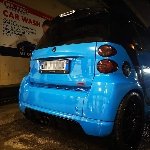
Inviato September 25, 201313 yr Autore comment_501270 buonaseraaaa!!eccoci dopo 1 settimana e mezza ho terminato i benedetti fari! un macello a farli!non ci penso neanche minimamente a rifarli! ahhahahahah ecco le foto!a voi i commenti! Segnala
Inviato September 25, 201313 yr comment_501272 Ma quel cerchietto giallo che pipinarola è? Inviato dal mio GT-I9100 Segnala
Inviato September 25, 201313 yr comment_501274 Si lo so che sono angel eh.. Siccome sono gialli.. Non credo siano ccfl.. Inviato dal mio GT-I9100 Modificato September 25, 201313 yr da Enry.smart Segnala
Inviato September 25, 201313 yr comment_501275 Davvero belli ho visto pure le foto su face! Inviato dal mio iPhone 4s usando Tapatalk 2 Segnala
Inviato September 25, 201313 yr comment_501288 Wow che lavorone jay complimenti sono davvero unici e fatti benissimo! bravo mi piacciono Modificato September 25, 201313 yr da davidebrabus89 Segnala
Inviato September 25, 201313 yr comment_501289 Bravo Jay! Venerdì ci fai vedere il lavorone dal vivo! Segnala
Inviato September 26, 201313 yr comment_501336 Belli! Prova a metterli in vendita a un prezzo folle, se te li comprano direi che varrebbe la pena rifarteli dopo Segnala
Inviato September 26, 201313 yr comment_501371 Ora capisco per vuoi lo spoiler.. Grande Inviato dal mio GT-I9100 Segnala
Inviato September 26, 201313 yr comment_501375 Impresa titanica!! Immagino il casino! COMPLIMENTI! Modificato September 26, 201313 yr da Teuzzolo87 Segnala

Join the conversation
You can post now and register later. If you have an account, sign in now to post with your account.