Inviato May 27, 201412 yr comment_540609 Troppo fico..... Bravi e complimenti a tutti....dalle mie parti non ci stà un cane per queste cose Segnala
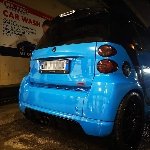
Inviato June 19, 201412 yr comment_543296 Ma perché sempre queste atmosfere buie e tetre? Almeno lui le foto le fa alla sua Inviato dal mio GT-I9505 utilizzando Tapatalk Segnala
Inviato June 19, 201412 yr Autore comment_543297 Ma perché sempre queste atmosfere buie e tetre? barb le foto sono così perchè è stato usato solo un flash e la luce era minima Segnala
Inviato June 19, 201412 yr comment_543307 Ma fatemi capire na cosa.......ma voi tutte le volte entrate di nascosto in quel povero centro commerciale.....di nascosto? Segnala
Inviato June 19, 201412 yr comment_543315 Sicuramente di nascosto... Per forza.....per avere un ala del parcheggio sempre sgombera Segnala
Inviato June 19, 201412 yr Autore comment_543366 No no vi sbagliate,il centro commerciale è sempre aperto Inviato dal mio iPhone5 utilizzando Tapatalk 2 Segnala
Inviato June 19, 201412 yr comment_543375 Io andrei di roadster! o 451.. La 450 ormai è passata! Lollo se dici ancora questa STUPIDAGGINE ti Faccio cadere in una siepe di sberle Segnala
Inviato June 19, 201412 yr comment_543377 Bellissime le foto.....sono molto particolari.... molto fico il contesto,..il raduno nel parcheggio coperto, poi la poca luminositá secondo me si intona alla perfezione... Segnala
Inviato June 20, 201412 yr comment_543427 Jay....io di solito faccio cose originali.......ma vorrei copiarti quei flap che hai all'anteriore. Dove posso trovarli?? Segnala
Inviato June 21, 201412 yr comment_543506 Barb va meglio così?! ti piace di più l ambientazione?! Segnala
Inviato June 21, 201412 yr comment_543533 Il bacarozzo per ultimo però Inviato dal mio GT-I9505 utilizzando Tapatalk Segnala
Inviato July 16, 201412 yr comment_545742 Eh... Va!! ... che non ti fai mai vedere ultimamente... Segnala
Inviato July 16, 201412 yr Autore comment_545746 Eh... Va!! ... che non ti fai mai vedere ultimamente... ehhh tra lavoro e preparare smart non riesco piu a stare dietro al forum Segnala
Inviato July 16, 201412 yr Autore comment_545770 Ne hai fatto una professione? Insieme a Peppe? No diciamo qualche extra Inviato dal mio iPhone5 utilizzando Tapatalk 2 Segnala

Join the conversation
You can post now and register later. If you have an account, sign in now to post with your account.