Inviato March 14, 201313 yr comment_465686 La prendo sabato...... L'attesa aumenta il desiderio ahahha Segnala
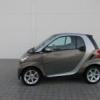
Inviato March 14, 201313 yr Autore comment_465714 Eh siiiiiii!!!! ah non ha il cassettino ècome quella in foto Segnala
Inviato March 14, 201313 yr comment_465718 Volendo puoi fartelo aggiungere. Una mancanza dei primi esemplari Segnala
Inviato March 18, 201313 yr Autore comment_466341 Come si fa a mettere le foto a pieno schermo? VORREI POSTARE LE MIE MA NON RIESCO Ciao Segnala
Inviato March 18, 201313 yr comment_466345 le carichi su siti come imageshack e posti il link Segnala
Inviato March 18, 201313 yr Autore comment_466354 Eccola: http://imageshack.us/photo/my-images/39/smart4.jpg/ http://imageshack.us/photo/my-images/593/smart5.jpg/ http://imageshack.us/photo/my-images/534/smart1b.jpg/ http://imageshack.us/photo/my-images/404/smart2r.jpg/ Ah dietro monta gomme 195/R50, davanti 175/R55 Modificato March 18, 201313 yr da mastrod74 Segnala
Inviato March 18, 201313 yr comment_466385 molto bella ma sinceramente gli interni non mi vanno proprio giù. sarà che stona un pò troppo dal colore del cruscotto Segnala
Inviato March 19, 201313 yr Autore comment_466452 Mi consigliate un autoradio con navigatore da montare? Segnala
Inviato March 19, 201313 yr comment_466457 Mi consigliate un autoradio con navigatore da montare? Come marca ti coniglio alpine jvc o pioneer Segnala
Inviato March 19, 201313 yr comment_466472 Jvc nt30 perfetta,l ho avuta quasi 1 anno poi si e rotto il frontalino che mi e caduto e ho montato un jvc av 60 bt Segnala
Inviato March 19, 201313 yr Autore comment_466479 Avevo pensato a questo non costa moltissimo: http://www.eplaza.it/Autoradio-con-Navigatore-JVC-KW-NT30E_JVAUR147.aspx Modificato March 19, 201313 yr da mastrod74 Segnala
Inviato March 19, 201313 yr comment_466481 Dimmi il modello che mi apre solo il sito di eplaza non la pagina dettagliata Segnala
Inviato March 19, 201313 yr Autore comment_466484 Cinesone? http://www.tradesolution.hk/e/ptxwebstore_product/588.html Segnala
Inviato March 19, 201313 yr comment_466485 Guarda mastrod evita tutto tranne jvc (il migliore per i miei gusti soprattutto per il frontalino removibile che di questi tempi e fondamentale) kenwood sarebbero gemelli dei jvc,alpine costano troppo secondo me,pioneer non hanno quasi mai il frontalino removibile e quindi te lo rubano da un momento all altro.poi vedi tu Segnala
Inviato March 19, 201313 yr comment_466487 I monitor smart (bosch) valgono poco in confronto ad un kenwood o jvc che sia Segnala
Inviato March 24, 201313 yr Autore comment_467230 Il concessionario mi ha regalato un navigatore MIO M610. Quasi quasi prendo questo... http://www.unieuro.it/audio/autoradio/autoradio-tv/alpine-ive-w530bt-H18KCggGUL0AAAE8o5ltPbes-j0QKCgKs3KIAAAEThFM721Rm.html?JumpTo=OfferList&omnitureEvar3=browse Segnala
Inviato March 25, 201313 yr comment_467362 Il concessionario mi ha regalato un navigatore MIO M610. Quasi quasi prendo questo... http://www.unieuro.it/audio/autoradio/autoradio-tv/alpine-ive-w530bt-H18KCggGUL0AAAE8o5ltPbes-j0QKCgKs3KIAAAEThFM721Rm.html?JumpTo=OfferList&omnitureEvar3=browse è come quella che monto io! mi trovo benissimo se vuoi guarda la mia pagine che avevo postato qualche foto, se vuoi consigli chiedi pure Segnala
Inviato March 30, 201313 yr Autore comment_468102 http://www.eprice.it/autoradio-dvd-sintomonitor-PIONEER/d-4447519?meta=TRVP&utm_source=TRVP&utm_term=Sistema+per+iPhone+2+DIN+SPH-DA02+Display+Multi-Touch+6.1%22+Potenza+4+x+50+Watt+Bluetooth+GPS+porta+USB&utm_medium=cpc&utm_campaign=Autoradio+DVD+Sintomonitor Buon prezzo! Segnala
Inviato March 30, 201313 yr comment_468107 Mi viene un dubbio, non è che serve solo per collegare l'iPhone? Perché nè nella descrizione nè nelle immagini di fa riferimento alla radio rds.. Segnala
Inviato March 31, 201313 yr Autore comment_468308 Il concessionario mi ha regalato un navigatore MIO M610. Quasi quasi prendo questo... http://www.unieuro.it/audio/autoradio/autoradio-tv/alpine-ive-w530bt-H18KCggGUL0AAAE8o5ltPbes-j0QKCgKs3KIAAAEThFM721Rm.html?JumpTo=OfferList&omnitureEvar3=browse è come quella che monto io! mi trovo benissimo se vuoi guarda la mia pagine che avevo postato qualche foto, se vuoi consigli chiedi pure Che mascherina devo comprare? Mi segnali un sito? Segnala

Join the conversation
You can post now and register later. If you have an account, sign in now to post with your account.